Hide any shipping method in Shopify — safely
Shopify's native shipping settings can show rates by zone, weight, and price — but they can't hide a method when a condition is met: a PO box in the address, an oversized item in the cart, a wholesale customer who shouldn't see retail rates. Merchants end up hacking checkout scripts or paying for heavyweight rate platforms.
Drydock does it with one rule, built in a visual editor, run against a simulated checkout first, and published as a version you can roll back in one click.
Then Hide options titled “Express”
Test it Simulate a PO-box address → Express gone. Street address → Express back.
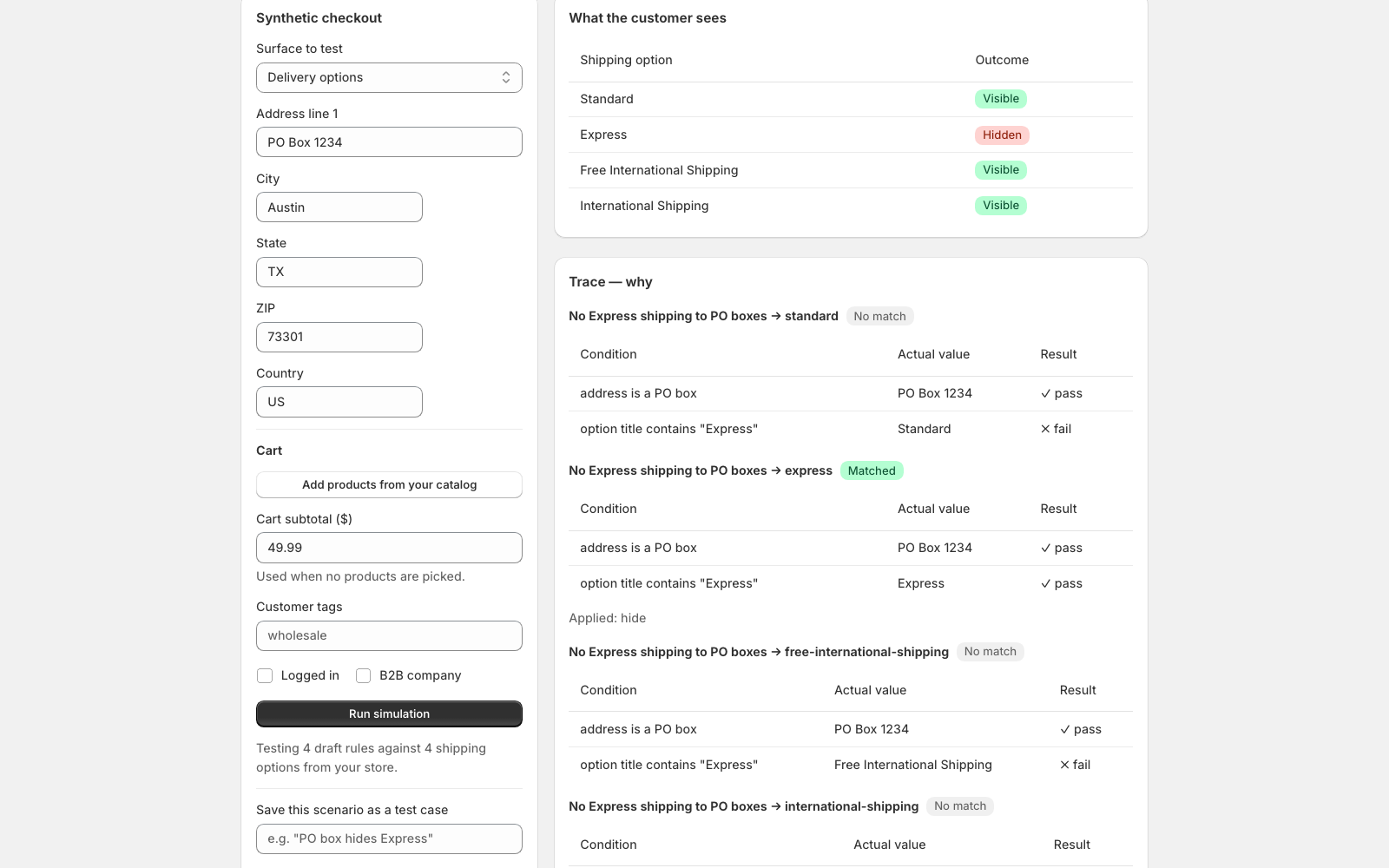
Test first. Undo after. Always.
Drydock runs every draft rule against a synthetic checkout — real products, any address, any customer — and shows a trace of every condition with the actual values compared. Save good scenarios as test cases and they re-run on every publish, so a rule that changes an outcome gets flagged on the publish screen instead of at your checkout. Every publish is an immutable version with a diff, and restoring a previous version is one click.
Build this rule and test it in five minutes
Free plan includes the full simulator with traces. No card, nothing touches your live checkout until you publish.
Install Drydock free